Xiaomi Yi -- The Ant Camera
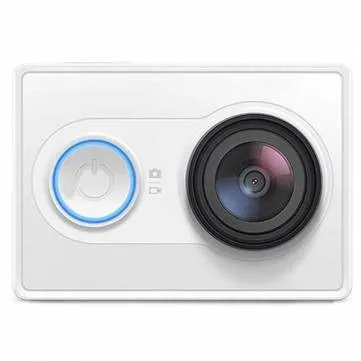
This is a guide to the Xiaomi Yi action camera.
WaffleFPV
The user WaffleFPV over at FPVLab.com wrote an awesome custom script that massively improves the recording quality of the camera.
You can read the thread here: http://goo.gl/f41uoC, but basically:
-
Download the latest version of the script, here’s a direct link to Version 8.2: https://www.dropbox.com/s/4rwp7gvzgd93lck/WaffleV8.2.zip?dl=1
-
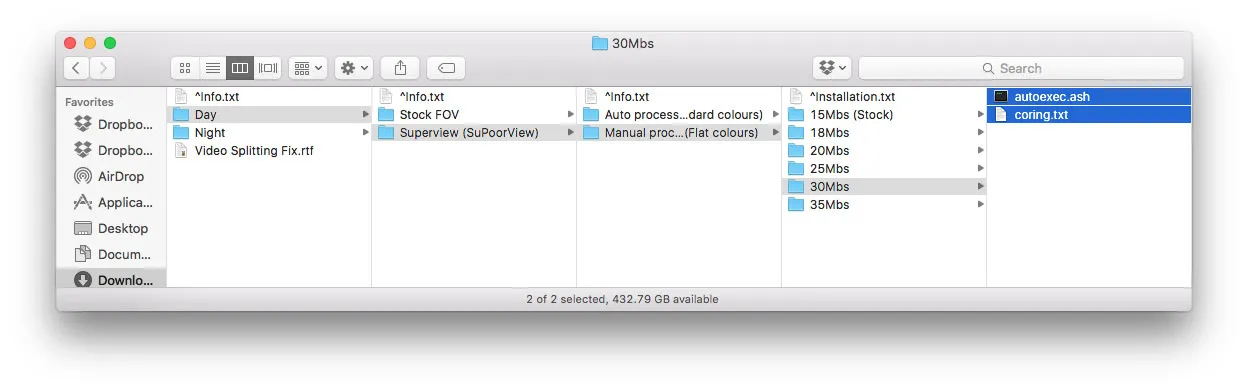
Navigate through the folders, choosing whatever options you want then copy the two files onto the root of your SDCard
Building A Video Out Cable
-
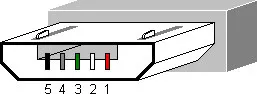
Pin #4 — Video out (the center in a normal RCA jack)
-
Pin #5 — Ground
Download Links
-
click the button at the bottom
-
or grab it from my Dropbox
-
-
latest firmware is available here, enter your serial number in the box to download:
-
or grab it from my Dropbox
-
Firmware Update
-
Copy the firmware downloaded above to the root of your microsd card
-
Rename it
firmware.bin -
Turn your Yi on and plug it into the power cord (USB), I didn’t use a computer for this, but a wall-to-usb brick
- It will work without plugging in the Yi, if it is charged enough. However, flashing seems to always work when plugged into power
-
It will start beeping constantly for a minute or so then the light will flash red on the front and the camera turn off. Wait until the camera turns off if it is beeping constantly. Losing power during flashing could brick your camera
-
firmware.bin will be deleted after it flashes successfully, so you’re good to go!